Helprace is a customer service software that offers a scalable community built for accommodating your user base and guiding customer communication.
Ready to Buy?
Starts from $29.95 Immediate Download No monthly fees No hidden fees 6 months free support 6 months free updates 100% Secure ordering Full source code Money-back guarantee
How Form Processor Pro handles web forms
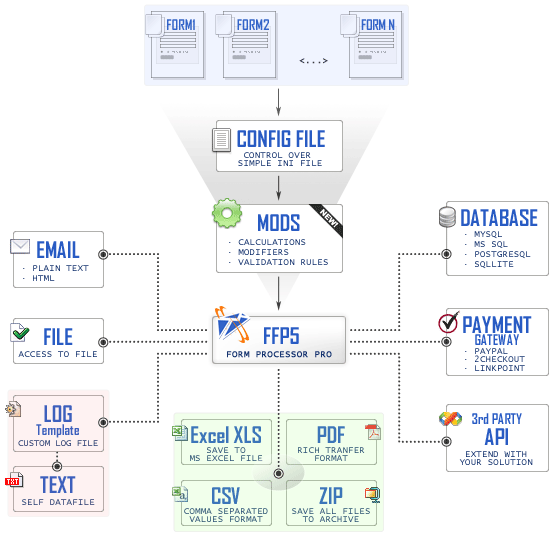
The following chart on Fig. 1 demonstrates how data streams are processed by Form Processor Pro.
That's how Form Processor Pro manages a common web form:
Initialization
When a web site visitor clicks on “Submit” button in your web form, Form Processor Pro starts loading Configuration File. It is a simple INI-file where you can specify all your forms and their settings. This file also sets basic variables to make Form Processor Pro work correctly.
Form Data Input
Submitted data is being checked for compliance with form field validations and modifiers and generates detailed highlighted error messages if check fails or incompliant data is submitted. Modifiers used in order to perform certain transformations with user input prior inserting result into template or generating output.
Afterward, submitted data is being parsed according to field validations and rules (required fields, email field etc.), processed calculations and function calls. All data gets parsed and processed by Form Processor Pro and now ready for output.
Form Data Output
According to variables and their values set in Configuration File, Form Processor Pro sends an output to a web browser, sends data by email and saves data to log files, different types of databases, CSV, XLS, PDF file formats or processes data to the payment gateways. Also Form Processor Pro gives you an opportunity to archive files before sending or redirect all form data to another third party software via GET request. Combinations of those are possible. You can define the output root in the Configuration file.














 Starts from $29.95